Song lyrics app for cover bands
Setlists synced
on every stage
Setlist ready before the show.
Changed in seconds when needed.
Song lyrics synced across every device on stage - from the vocalist to the rhythm section, in real time.
Lyricco for cover bands - what you gain
Setlists for every concert
Create a setlist for every gig from any songs in your repertoire. Reorder by dragging songs. Setlist ready in 2 minutes.
Live sync on stage
Move to the next song - everyone sees it instantly on their screens. Vocalist, guitarist, bassist - always on the same page.
Chords, key, and transposition for every musician
The song's key visible in the header, chords in ChordPro format above the lyrics. Transpose the entire song with one click. The vocalist hides chords, the guitarist and keyboardist keep them visible - each device decides independently.
High-contrast stage view
Black background, bright text - readable in any lighting conditions. Color-code choruses and verses however your band needs.
Offline sync - a club with no signal is no problem
With internet, one musician changes songs for everyone at once. Without signal - start sync from the Android or Windows app. One device becomes a local server, the rest join via Wi-Fi. A club with bad internet is no longer a problem.
Import from Songbook Pro and ChordPro files
Have a repertoire in Songbook Pro or .cho files? Import the whole set into Lyricco in minutes - with all chords. You don't start from scratch, even with 300 songs in your repertoire.
See it in action
How it works in practice
A short walkthrough of Lyricco's core features - see how lyrics sync across multiple devices in real time.
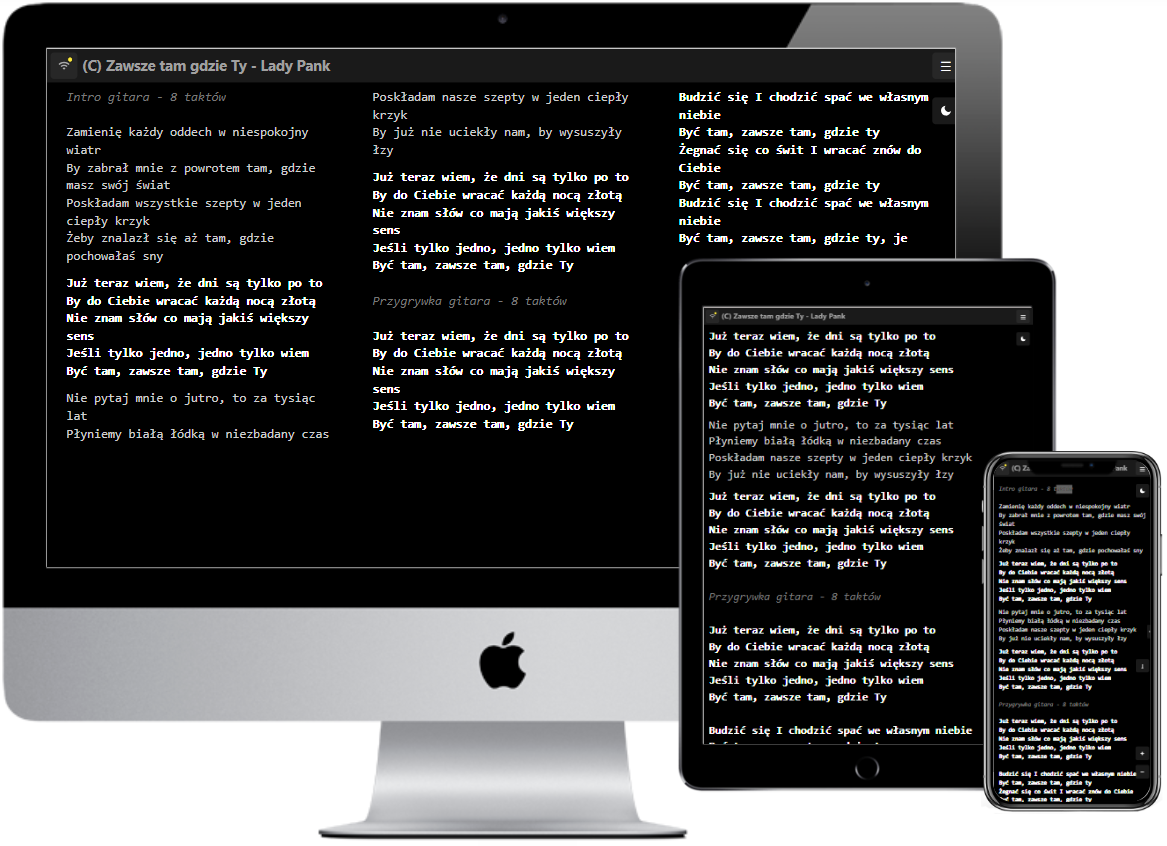
Stage view
Clear lyrics
on a dark club stage
Black background, bright text, high contrast. Lyricco's stage view is readable even under harsh stage lighting and in a dark club.
- ✓ Color-coding verses, choruses, and comments
- ✓ Color customization for the entire band
- ✓ Song key visible in the header
- ✓ Offline mode - works without signal in the club
- ✓ Vocalist hides chords, guitarist has them visible - each device decides independently
- ✓ Works identically on phone, tablet, and laptop - iOS, Android, and Windows
- ✓ Sync via internet or Wi-Fi - the whole band sees the same thing at the same moment
- ✓ Bluetooth pedal support and synced auto-scroll
- ✓ Messages to the band during the gig - no hand signals or shouting
How much does Lyricco cost for a cover band?
Solo - $3 / mo.
1 device, up to 100 songs, setlists. For soloists and duos who don't need sync.
Band - $6 / mo.
Up to 5 devices, up to 1000 songs, full live sync. Ideal for 3-5 person lineups.
Band Plus - $9 / mo.
Up to 10 devices, up to 1000 songs, full live sync. For bigger cover lineups (6-10 people).
Choir - $16 / mo.
Up to 30 devices, unlimited repertoire. For bigger lineups or bands with extra instrumentalists and vocalists.
Pricing
Plans tailored to your band size
Billed once a year. No automatic renewals. After expiration, the account switches to the free Basic plan.
Basic
The basic plan for everyone
free forever
up to 30 songs
1 device
- ✓ Repertoire management
- ✓ Repertoire import
- ✓ AI Assistant - 10 songs
- ✓ Stage view
- ✓ App (Android, Windows, PWA)
- ✕ Setlists
- ✕ Live sync
- ✕ Invite musicians
Solo
For solo artists and session musicians with a modest repertoire
Billed annually ($36 / year)
up to 100 songs
1 device
- ✓ Everything in Basic
- ✓ AI Assistant - 30 songs
- ✓ Setlists
- ✕ Live sync
- ✕ Invite musicians
Band
For wedding bands and cover bands
Billed annually ($72 / year)
up to 1000 songs
up to 5 devices
- ✓ Everything in Solo
- ✓ AI Assistant - 100 songs
- ✓ Live sync
- ✓ Invite musicians
Band Plus
For large wedding and event bands
Billed annually ($108 / year)
up to 1000 songs
up to 10 devices
- ✓ Everything in Band
- ✓ Up to 10 devices / users
- ✓ AI Assistant - 200 songs
Choir
For choirs and large stage ensembles
Billed annually ($192 / year)
unlimited songs
up to 30 devices
- ✓ Everything in Band Plus
- ✓ AI Assistant - 300 songs
- ✓ Up to 30 devices at once
- ✓ For choirs and large ensembles
How to start - 3 steps
Sign up and upload your repertoire
Add your band's song lyrics - manually or by importing from Songbook Pro and ChordPro files.
Invite musicians by email
Every musician creates an account in a minute and gets access to the current repertoire.
A setlist before every show
Create a setlist for every show, arrange the order, open stage view - and play.
FAQ
Frequently asked questions
As many as you want. Create a separate setlist for every show, picking songs from your entire repertoire - even if you have several hundred songs in your database. Reordering is just dragging items on the list, done in minutes.
Add the next song to the live queue - the whole band sees it on their screen before the current song even ends. You can also just pick any song from the full repertoire at any moment - the change is instantly visible to all synced musicians.
Just the Android or Windows app is enough. You start sync on one device - it becomes a local server, the rest of the band joins via Wi-Fi. No internet needed - any router on site or a phone hotspot will do.
Transposition applies to a specific song - you choose how many semitones up or down, and all chords in the text change automatically. Every musician sees the same, already transposed version on their device.
Yes. Lyricco supports import from Songbook Pro and ChordPro files (.cho), including all chords. Importing an entire repertoire, even several hundred songs, takes just a few minutes - you don't start from scratch.
No. Registration is free and you immediately get full access to the system - you can add songs, invite musicians, and use sync without any obligations. Plans are billed once a year, with no automatic renewals.
Ready to play without the chaos?
Join Lyricco - setlists under control, lyrics synced, stage view readable in any conditions.